本地开发环境配置指南
1. 环境要求
- Windows 10/11
- VS Code
- Git(可选)
2. 安装 Ruby
- 访问 RubyInstaller
- 下载 Ruby+Devkit 3.1.x (x64)版本
- 运行安装程序
- ✅ 勾选”Add Ruby executables to your PATH”
- 完成后点击 finish
3. 验证安装
打开新的命令提示符(cmd),运行:
1
2
ruby -v
gem -v
4. 安装必要组件
1
gem install jekyll bundler
5. 项目依赖安装
在项目根目录下运行:
1
bundle install
6. 本地预览
1
bundle exec jekyll serve
访问 http://localhost:4000 即可预览网站
常见问题
如果遇到 SSL 证书问题
1
2
gem sources --add https://mirrors.tuna.tsinghua.edu.cn/rubygems/ --remove https://rubygems.org/
bundle config mirror.https://rubygems.org https://mirrors.tuna.tsinghua.edu.cn/rubygems
如果使用 VS Code 终端提示找不到命令
- 使用 Ctrl+Shift+P
- 输入 “Terminal: Select Default Profile”
- 选择 “Command Prompt” 或 “PowerShell”
- 重新打开终端
究极办法:
将vscode 运行时,修改为以管理员权限运行,具体可以参考:
- 右键VsCode并点开属性选项
- 切换至兼容性
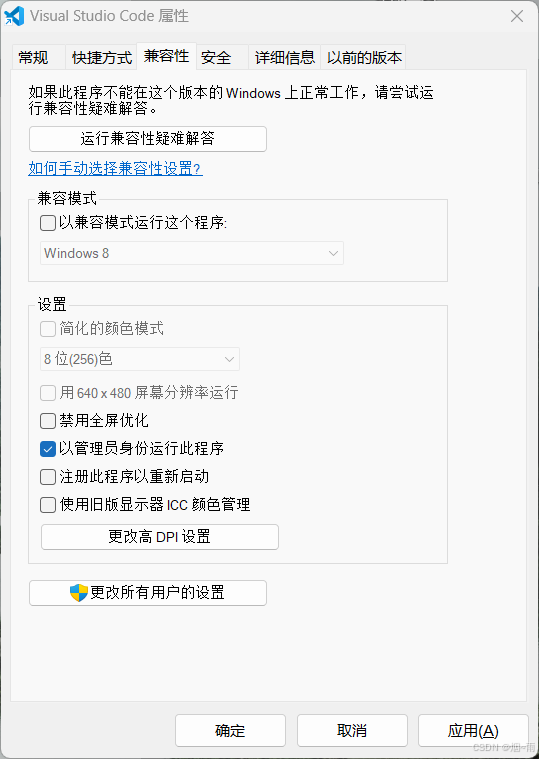
- 勾选“以管理员身份运行此程序”。 应用 –> 保存 –> 关闭
开发提示
- 修改文件后,Jekyll 会自动重新生成网站内容
- 只需刷新浏览器即可看到更新
_config.yml的修改需要重启服务器